How do you send a digital invitation card on WhatsApp?
To send your card on WhatsApp, publish it, copy its link, and paste that link into any WhatsApp chat or group. Guests tap the link to open the card on their phone, with no app to install, and can RSVP straight away.
Why a link, not an invitation poster
An EkadInvite digital invitation is a web page, so what you actually send on WhatsApp is one link. A guest taps it and the card opens in their phone's browser: nothing to install, no account to register. The same link can be pasted again and again into a private chat, a family group or a broadcast list, and what sits behind it can still be edited after it has gone out. That is the difference from an invitation poster you have already sent: once it leaves your phone, it stays exactly as it was forever.
Step by step
- 1
Finish and publish your card in the editor.
- 2
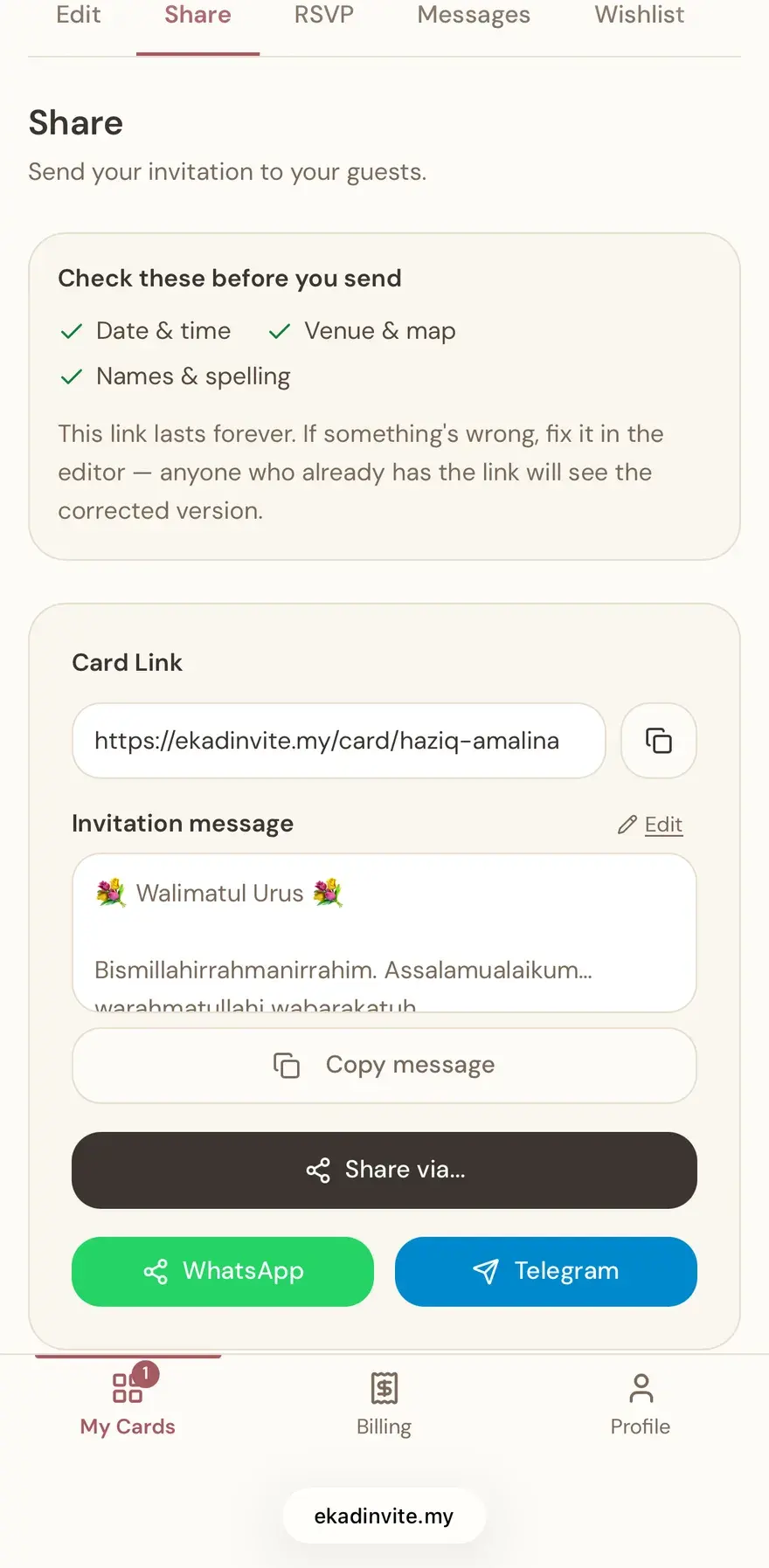
On the Share screen, tap Copy link (or the WhatsApp button).
- 3
Open the WhatsApp chat or group you want to invite.
- 4
Paste the link and send - a preview image appears automatically.
- 5
Guests tap it to open the card and RSVP.
What appears when the link is pasted
When the link lands in a chat, WhatsApp draws a small preview card above your message. That preview is built from the Open Graph tags on the card page, and EkadInvite generates those tags for every published card: the couple's names, the type of event, the date and the venue name, together with an image. The card page itself is set to noindex and disallowed in robots.txt, so your card never surfaces in search results even after the link has travelled through dozens of groups. Preview crawlers are listed as allowed in robots.txt specifically. WhatsApp and Telegram fetch the page regardless of that block, but Facebook, Messenger, X, LinkedIn and Slack honour robots.txt, so it is that allowance that keeps their previews working.
Common questions
Why does the preview image not appear in my group?
The preview is generated on the phone that sends the link, not on each group member's phone. WhatsApp has a security setting called Disable link previews under Settings, Privacy, then Advanced. According to the WhatsApp Help Center, if you turn it on, the links you send to others will not generate a link preview at all, and the setting is turned off by default. It also has no effect on links you receive from other people. So if your link goes out with no image in one group, check that setting on your own phone before blaming the card.
Can I send it to every guest at once?
You can, with one condition people routinely miss. A WhatsApp broadcast list takes up to 256 contacts each, but only people who have already saved your number in their phone's address book will receive the broadcast message. A guest who never saved your number receives nothing, and WhatsApp's own advice is to ask them to add you to their contacts first. Recipients see it as an individual message from you, and their replies come back as one-to-one chats rather than into a shared group. For guests who do not have your number saved, send the link directly in a normal chat.
Is it safe for the card link to spread through a large group?
Anyone holding the link can open it, so treat a digital card the way you would treat a printed one that can be passed along. What is protected is public visibility: the card page is set to noindex and blocked from search crawlers, so it is never collected into any search index. The DuitNow gift section only appears once you enter your own DuitNow or bank details on a Diamond card, while the RSVP replies, with your guests' names and phone numbers, stay in your dashboard rather than on the face of the card other guests see.
Do guests need to install an app or create an account?
No. The card opens as an ordinary web page in a phone browser, so a guest only has to tap the link. There is nothing to install and no account to register, including to answer the RSVP or leave a message in the guestbook. That matters most for elderly guests, who may not be comfortable installing a new app just to look at one invitation.
Can I give VIP guests their own link?
Yes, on a Diamond card. Each VIP guest gets their own link from the dashboard, and a card opened through that link shows that guest's name and honorific in a dedicated section, along with a personal note if you wrote one. Send a VIP link in a private chat rather than in a group, because it is addressed to one named guest.
Do I still need to send printed cards as well?
For some guests, yes. The UTHM event protocol manual states that invitation cards should be distributed four weeks before the event, that the deadline for replies is one week before the event, and that cards should be delivered by hand when less than two weeks remain. Its own preface says the manual guides mainly functions at or outside the university involving state dignitaries and distinguished guests, so we apply its timings here as the nearest officially published Malaysian benchmark. Visiting in person, or a printed card, is still the fitting way to invite elderly relatives, close family and dignitaries. The WhatsApp link covers everyone else, and because EkadInvite is a one-time purchase at RM29 for Gold or RM69 for Diamond, the number of guests who receive that link adds nothing to the cost.
What if the date or venue changes after the link has spread?
Edit the card in the editor and save. A card's link address is locked once the card is published, so the link already circulating in your WhatsApp groups will not break, and every guest who opens it again sees the current details. Send a follow-up message in the same groups as well, so guests know something changed. Do not count on them reopening the link on their own.
Pin the message in a family group so latecomers can always find it. You can also share the QR code for printed save-the-dates.
Related: When to Send Wedding Invitations · Track RSVP
Sources
- WhatsApp Help Center, “How to use broadcast lists” (2026-08-26)
- WhatsApp Help Center, “How to disable link previews” (2026-08-26)
- The Open Graph protocol (2026-08-26)
- Manual Sambutan dan Protokol Majlis UTHM, Edisi Ke 3 2025, §9.3 (2026-08-26)